How to Get Into E-Learning Voice Over: The Work, the Sound, the Read

If you can read a paragraph about fire extinguishers and make somebody actually take it in, there is steady work in that. E-learning narration is the least glamorous corner of voice over and one of the busiest. It rarely makes anyone’s showreel highlight, and plenty of working voice actors pay their rent with it.
This guide is for anyone with a clear, warm read who wants regular corporate and training work: what the job actually involves, the sound your files have to hit, how a course gets built around your audio, and how to get the first one.
What e-learning voice over actually is
E-learning is the audio inside a training course. Somebody sits at a laptop, clicks through a module, and your voice explains what is on the screen. The categories repeat themselves once you have done a few:
- Compliance and safety. Fire drills, manual handling, food hygiene, anti-bribery, data protection. Dull on paper, and the single biggest slice of the market, because companies are legally obliged to run it every year.
- Onboarding. The first week at a new job, explained. Usually warmer in tone and often the best writing in the whole catalogue.
- Software and product walkthroughs. Click here, then here. Short modules, lots of them, and heavy on the pronunciation of product names.
- Higher education and professional development. Universities and membership bodies turning lectures into self-paced courses.
- Sales and technical training. Internal, product specific, and often refreshed every quarter, which is where the repeat business lives.
The commercial appeal is simple. A single course can run to forty or fifty separate audio files, each one built around a slide. Courses get revised, and the client wants the same voice back so the new slides match the old ones. That is why e-learning clients behave more like retainers than one-off buyers.
The read is teaching, not selling
The most common reason a new e-learning audition gets passed over is that it sounds like a commercial. Commercial reads push. Training reads explain. If your instinct at the end of a sentence is to lift and land it, you’ll need to unlearn that for this genre.
A few things consistently separate a booked e-learning read from a rejected one.
- One person, not a room. Picture a single employee at a desk with headphones on, three modules into a mandatory afternoon. You’re talking to them, not addressing a conference.
- Even energy across forty files. Slide nine cannot be brighter than slide thirty-one. Learners click through in one sitting and they hear the seam.
- Emphasis carries the meaning. In training copy, one word per sentence usually matters more than the rest. Find it and lean on it gently. Read it flat and the learner takes nothing in.
- Room for the screen. Instructional designers sync audio to animations. Slightly slower than your commercial pace, with real breaths between sentences, makes their job possible.
What the research says about your voice
There is a body of work in educational psychology on why narration helps people learn at all, and it’s worth knowing, because it tells you what clients are really buying.
The short version is that a voice works as a social signal. Writing in the Journal of Pedagogical Research, Nazmi Dinçer summarises the established position this way: “it has been found that a machine-synthesized voice does not carry the same degree of social cues as the human voice (Mayer et al., 2003).” Social cues matter because a learner who feels spoken to processes the material as a conversation rather than a document.
The useful wrinkle is what came after. Dinçer points to a 2020 study by Liew and colleagues which “found that voice enthusiasm is a factor to influence the amount of social cues rather than mere differentiation between human or non-human voice types.”
That’s the craft argument for this genre in one line. The effect isn’t automatic. Nobody is paying for a competent recitation of the words in order. They’re paying for the judgement about which idea in the paragraph the learner needs to catch, and for enough warmth that somebody stays awake through module four.
The sound standard every module has to hit
E-learning carries a technical bar that a lot of genres do not, because training is frequently covered by accessibility policy. Most large employers, most public bodies and most universities require their courses to meet the Web Content Accessibility Guidelines.
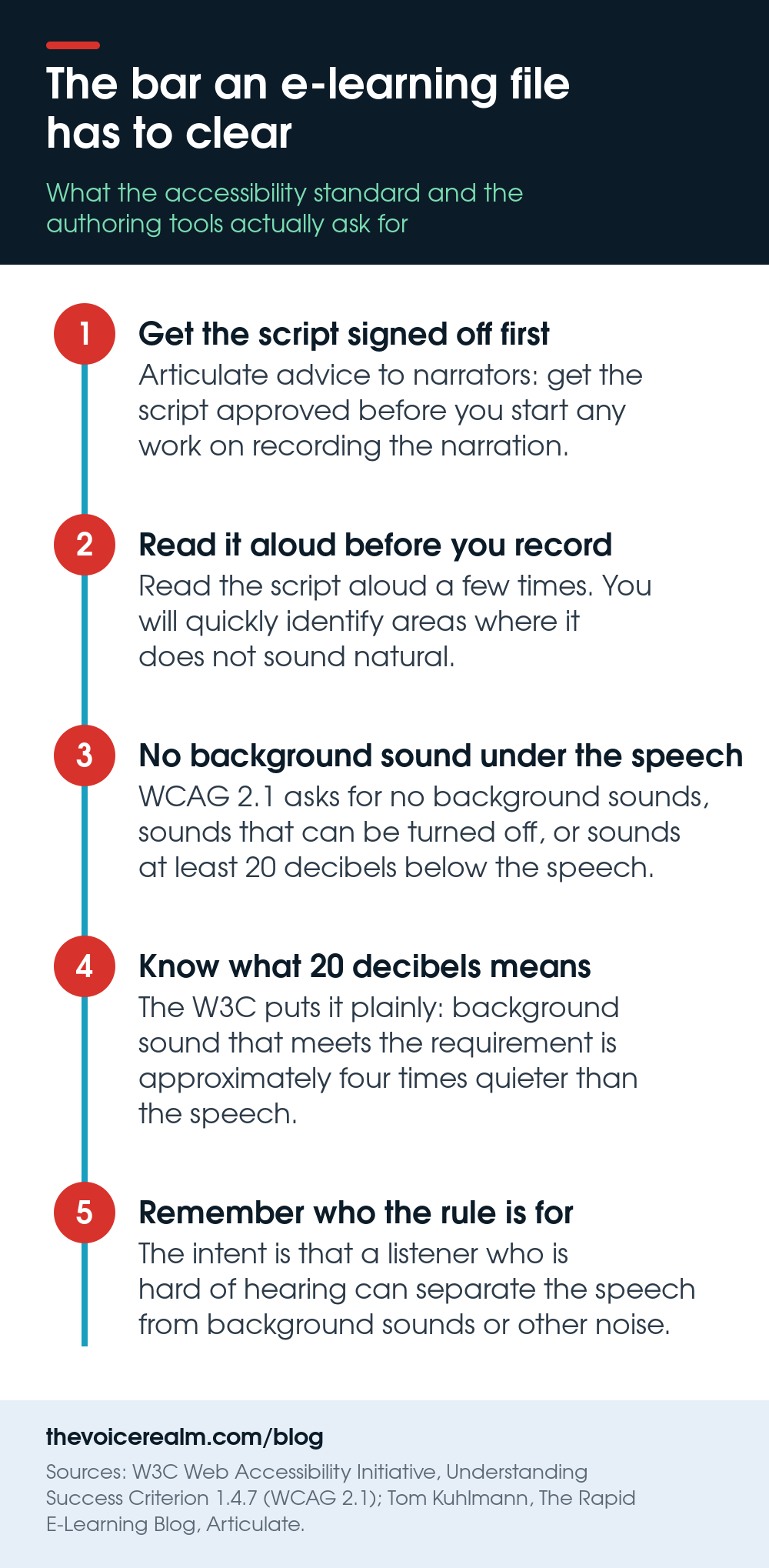
One of those success criteria is about your audio directly. Success Criterion 1.4.7, Low or No Background Audio, requires that where prerecorded audio is primarily speech, at least one of these is true: “The audio does not contain background sounds”, “The background sounds can be turned off”, or “The background sounds are at least 20 decibels lower than the foreground speech content, with the exception of occasional sounds that last for only one or two seconds.”
The W3C explains the reasoning plainly. “The intent of this success criterion is to ensure that any non-speech sounds are low enough that a user who is hard of hearing can separate the speech from background sounds or other noise foreground speech content.” Their note on what 20 decibels means in practice is the one to memorise, because it’s the standard your files get judged against: “background sound that meets this requirement will be approximately four times quieter than the foreground speech content.”
In practice that means your room noise floor has to be genuinely low, not just low enough to survive a noise reduction plugin. It also means that if the client lays a music bed under your track, it has to sit well below you, so your delivery needs to be even enough that they can set one level and leave it alone.
Beyond that criterion, the house rules are consistent across most clients.
- Mono WAV, 44.1 kHz, 16 or 24 bit, unless the brief says otherwise.
- Consistent loudness across every file in the set. Match the batch, not each file on its own.
- Top and tail cleanly, with a short, equal pad at the start and end of every file.
- No processing the client cannot undo. Light and reversible beats polished and baked in.
© The Voice Realm
How a course gets built around you
Most modules are assembled in an authoring tool such as Storyline, Rise or Captivate by an instructional designer. They write or adapt the script, build the slides, drop your audio in per slide, and time the animations to it.
That workflow explains nearly every instruction you’ll get. File names matter enormously, because a person is dragging forty files onto forty slides. Revisions come back as single lines rather than whole scripts, because one slide changed. And nobody wants slide twelve recorded in a different room from slides one to eleven.
The single most useful habit is the one Tom Kuhlmann keeps repeating on Articulate’s Rapid E-Learning Blog: “Get the script approved before you start any work on recording the narration.” Training scripts pass through legal, subject matter experts and a manager, and any of them can rewrite a paragraph after you’ve recorded it. Ask, in writing, whether the script is final and signed off. If it isn’t, quote for a revision round up front.
His advice on preparation is just as practical, and it’s the part new narrators skip: “Read the script aloud a few times. You’ll quickly identify areas where it doesn’t sound natural.” In this genre that pass isn’t optional, because training copy is often written by somebody who has never said a word of it out loud.
The pronunciation list is part of the job
Every corporate script contains at least one word you’ll get wrong. Internal system names, drug names, acronyms that are said as words in one office and spelled out in another, the surname of a founder, a chemical, a town.
Send the client a short list before you record, not after. Write out each term, ask for a phonetic spelling or a quick voice note, and keep the answers in a file with that client’s name on it. When they come back nine months later for the annual refresh, that file is why you’ll sound like the same course, and why you’ll get asked again.
If a term arrives with no guidance and nobody answers, record both versions and label them. It costs you thirty seconds and saves a whole pickup session.
A demo that gets you e-learning work
An e-learning demo is not a commercial demo with the music turned down. Keep it to about sixty to ninety seconds, three or four segments, and make each one sound like a different client.
Give them a compliance piece, something technical with real jargon handled cleanly, a warm onboarding read, and if you can, a short piece of narration from a scenario or role play, since branching scenarios are where a lot of the better work sits. Buyers listening to e-learning demos are checking for stamina and consistency, so they need to hear you sustain an explanatory tone, not spike for eight seconds.
If you’re still assembling a first demo of any kind, work on the craft before the production. The Voice Master Academy coaching programme is a sensible place to get structured feedback first, and our guide to why auditions go quiet covers most of what goes wrong long before the demo is the problem.
Where the work comes from
E-learning buyers aren’t talent agents. They’re instructional designers, learning and development managers, and the small production studios that build courses for large employers. They look for a voice when a project lands, book quickly, and reuse whoever made the last project painless.
- Course production studios. The companies that build training for banks, hospitals and manufacturers. A short, specific email with a link to an e-learning demo lands better here than anywhere else in voice over.
- Casting briefs. Corporate and training jobs come through the voice over jobs board most days, and they’re usually the ones with clean specs and a named deadline.
- Instructional design communities. The forums and groups where designers swap authoring tool problems are full of people who’ll need a voice next month.
- Repeat clients. This is the real answer. A course you narrate this year gets refreshed next year. Be easy to work with and the genre compounds.
Your first thirty days
- Week one. Record three practice modules from real published training scripts. Time yourself. Note where you drift faster.
- Week two. Fix the room. Get the noise floor down far enough that the 20 decibel rule is never a worry, and set a loudness target you can hit repeatably.
- Week three. Cut the demo. Four segments, four different clients, no music.
- Week four. Send twenty specific emails to course studios and apply to every training brief you see. Start a file per prospect for pronunciation notes and preferences.
Then keep the voice in shape, because this genre is long sessions of sustained talking rather than short bursts. The habits in our piece on protecting the instrument you work with matter more here than in almost any other category, and if you want a second genre that uses the same stamina, long-form narration leans on most of the same muscles.
E-learning won’t make you famous. It will make you busy, and it rewards exactly the things that are hard to fake: a quiet room, a steady read, and being the person who answers the email.
Sources: Dinçer, N. (2022), “The voice effect in multimedia instruction revisited: Does it still exist?”, Journal of Pedagogical Research, volume 6, issue 3, quoting Mayer et al. (2003) and Liew et al. (2020); W3C Web Accessibility Initiative, Understanding Success Criterion 1.4.7, Low or No Background Audio, WCAG 2.1; Tom Kuhlmann, The Rapid E-Learning Blog, Articulate, “How to Record Your Own Audio Narration”. All quotations are verbatim from those pages, read September 2026.