Blog
Blog
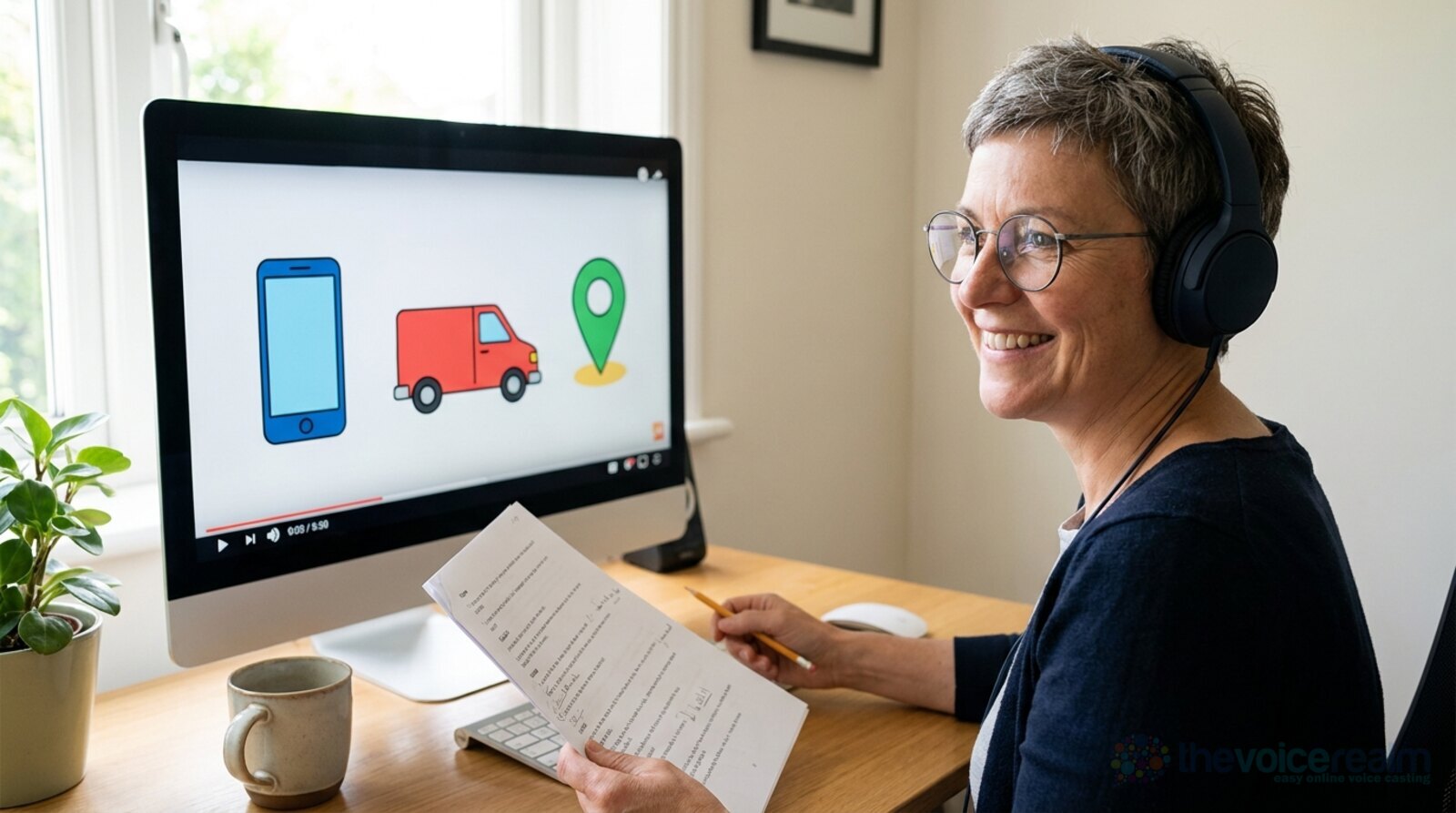
Somebody has built an app, a service or a clever new process, and they need ninety seconds of cartoon shapes and a friendly voice to explain it. That voice could be yours. Explainer videos are some of the most steady, repeatable work in voice over, and they reward a skill most people already have: talking to someone like you actually want them to understand.
This guide is for voice actors who want to book more explainer work, whether you’re new to the genre or you’ve done a few and want them to sound less like a read. We’ll cover what clients are after, how to pace and mark up the script, and the mistakes that quietly lose the job.
What an explainer video is, and why there’s so much of this work
An explainer is a short video, usually animated, that shows what a product or service does and why someone should care. You’ll find them on home pages, in app stores, in sales emails, in onboarding for new staff and at the top of help pages. Most run between one and two minutes.
Businesses make a lot of them. Wyzowl, a video company that has surveyed marketers and consumers about video every year for more than a decade, found in its 2026 report that social media videos are the most popular type marketers create, “with explainer videos a close second.” The same report says “96% of people have watched an explainer video to learn more about a product or service.”
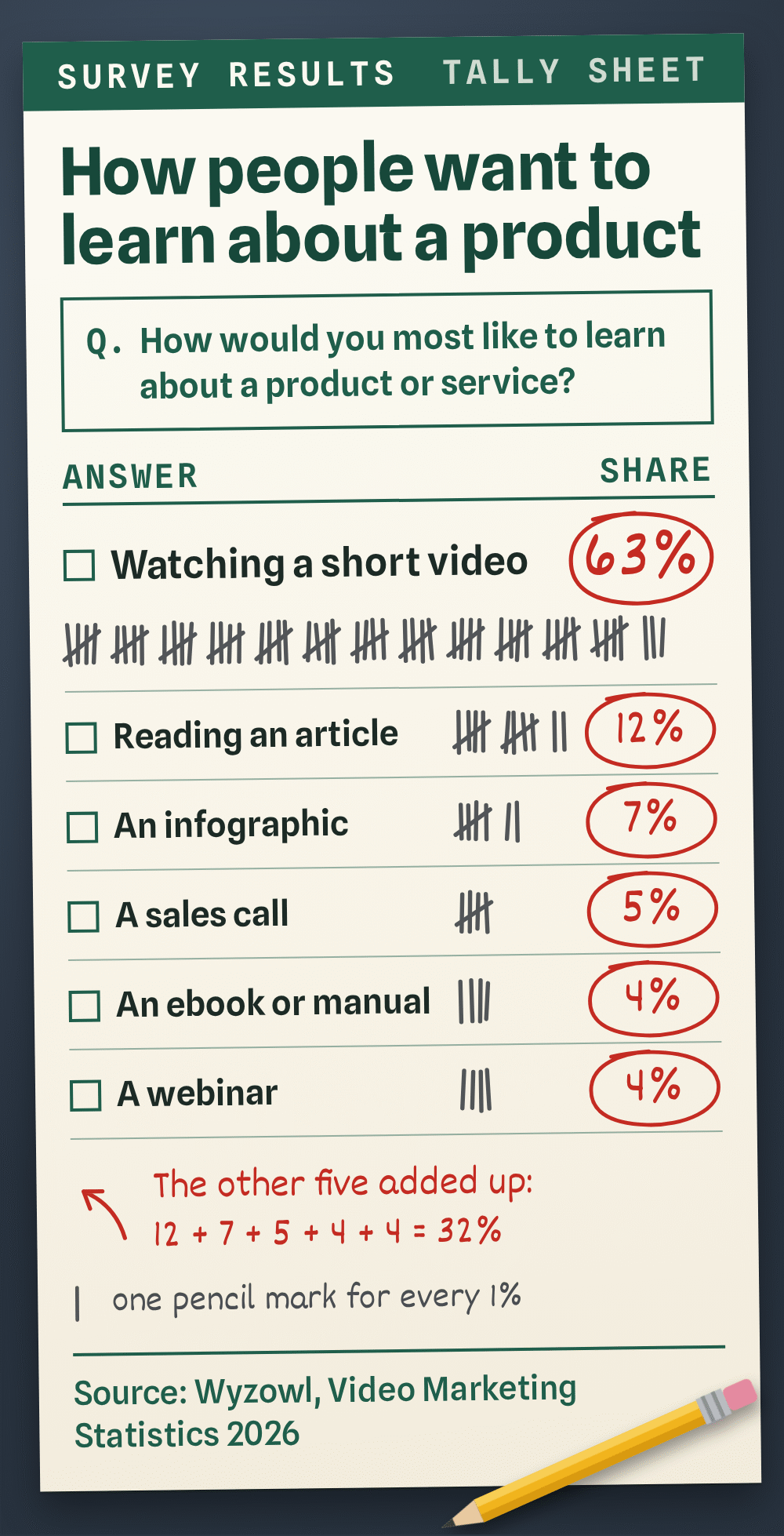
The audience side is just as strong. When Wyzowl asked people how they’d most like to learn about a product or service, a short video beat every other option by a wide margin, ahead of articles, manuals, sales calls and webinars put together.
What this means for you: the scripts keep coming, across every industry you can think of. Banking, software, healthcare, charities, training, logistics. Every one of them needs a voice that makes the complicated thing sound simple.
© The Voice Realm
The read: a friend who happens to know
Here’s the whole genre in one line. You’re not selling, and you’re not lecturing. You’re the friend who already uses the thing, explaining it over coffee.
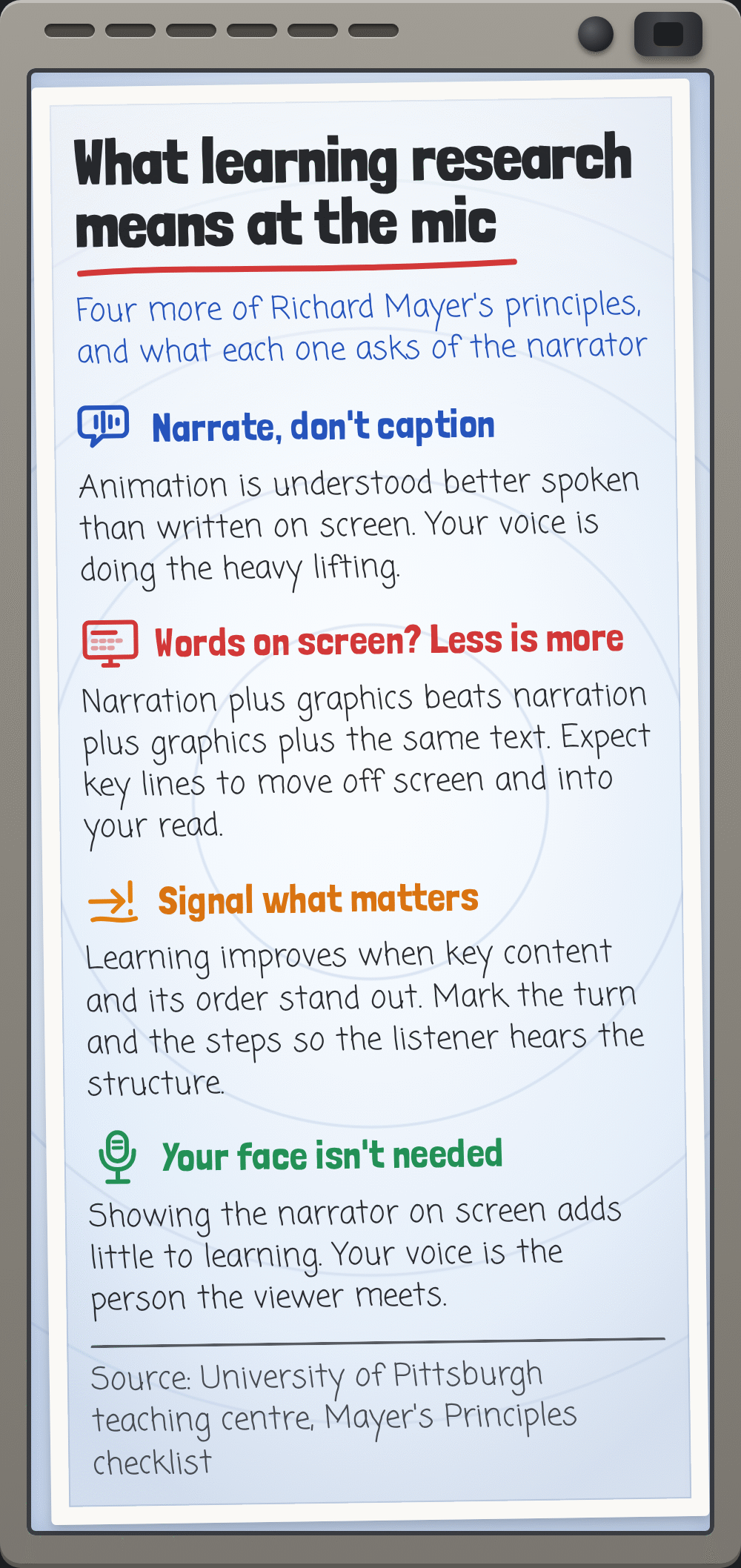
There’s research behind that. The educational psychologist Richard Mayer spent years testing what helps people learn from narrated graphics, and his findings are now standard teaching material in universities. The University of Pittsburgh’s teaching centre sums up two of them in a checklist for anyone making videos. The personalization principle: “Learning is improved when language in a multimedia resource is informal and conversational, which can make the learner feel more personally connected.” And the voice principle: “Learning is improved when a real human voice narrates multimedia rather than a synthesized computer voice.”
Clients may never have heard of Mayer, but they’ve felt it. That’s why explainer briefs are full of words like “warm,” “friendly,” “real” and “not salesy.” If you’ve ever struggled to work out what those words mean in practice, our piece on what “warm, natural, conversational” really asks for breaks them down.
© The Voice Realm
In practice, a conversational explainer read has a few things going on:
- One listener. Picture one specific person who has the problem the video solves. Talk to them, not to “viewers.”
- Real thought. Each sentence sounds like you’ve just had the idea, not like you’re reciting it.
- Easy confidence. You know this stuff. You don’t need to push to prove it.

© The Voice Realm
Timing: the pictures are waiting for you
Explainers are usually built around the voice. The animator gets your file, lays it on the timeline and moves the shapes to match what you say. Sometimes it’s the other way round, and you’re asked to fit a finished animation, but either way your timing is the backbone of the whole video.
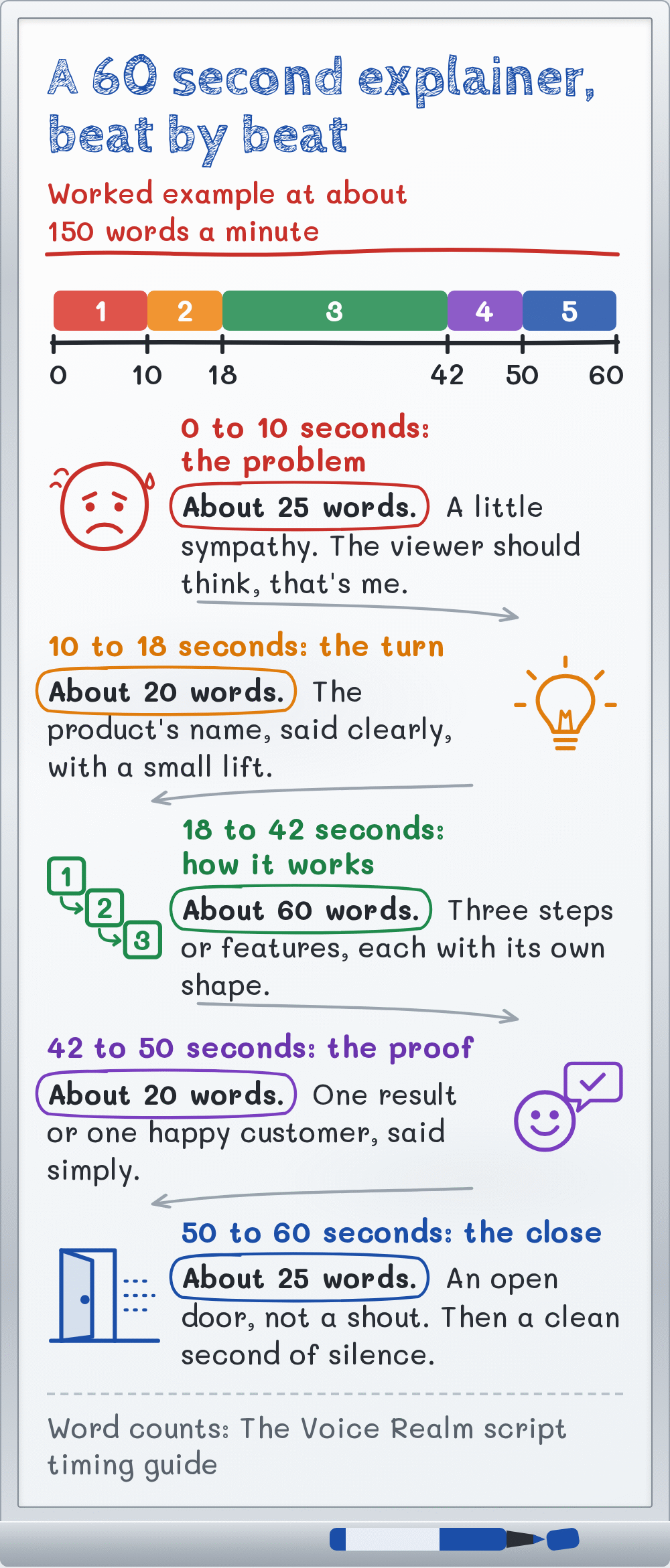
A comfortable conversational pace is around 150 words a minute, which is about 75 words in a 30 second spot. Our guide to timing a voice over script explains how to count it and what to do when a script runs long.
The key thing with explainers is steadiness. If you race through the first half and slow down at the end, the animator has to stretch and squash scenes to keep up. Keep a pace you could hold for the whole script, and let the picture changes happen in the gaps between your thoughts. Mayer’s research backs this up too: words and pictures work best when they land together, not one after the other.

 VoiceEditSuiteClean it up, check it, send it.Loudness NormalizerScript AccuracyRate CalculatorSee the suiteThe studio check is free to try.
If the client gives you a target length, ask whether it’s firm. “About sixty seconds” and “exactly 60.0 seconds for an ad slot” are very different jobs. If it’s firm and the script is too long for a natural read, tell them before you record, with a suggestion of what could go. Clients remember the actor who spotted it.
© The Voice Realm
Marking up an explainer script
Nearly every explainer follows the same shape, even when the writer didn’t plan it that way. Once you can see the shape, the read almost plans itself.
The opening is the problem. It’s the moment the viewer nods and thinks, “yes, that’s me.” Read it with a little sympathy, as if you’ve been there. Don’t make it a tragedy. Late invoices are annoying, not heartbreaking.
Then comes the turn, where the product’s name usually appears. This is the one spot where you can lift a little, like you’re sharing good news. Say the name clearly and the same way every time. Check the pronunciation with the client before you record if there’s any doubt.
The middle is how it works. This is where most explainers are won or lost. You’re often reading a short list of features or steps, and the trap is reading them like a list. Give each one its own small reason to exist, and vary the tune so they don’t all end on the same note.
The close is the call to action: “Download it today,” “Book a free demo,” “Find out more at” a web address. Keep it simple and inviting. Think of holding a door open, not shouting across a car park.
Mark those four sections on the page before you start, plus any words that need weight. If you’ve not built a mark-up habit yet, our walkthrough on marking up a script before you say a word shows the symbols most voice actors use.

© The Voice Realm
Leave room for the animation
A few practical habits make you very easy to work with on explainers, and animators notice.
Leave a clean breath of silence between paragraphs, a second or so, even if the script runs on. It gives the editor a place to cut, extend or slip in a sound effect. They can always close a gap. Opening one inside a sentence is much harder.
Keep your energy level the same from start to finish. A client listening to scene six should hear the same person who opened scene one, in the same mood, at the same distance from the mic. If you record the script in pieces, play back the last line of the previous take before you start the next, so the new take matches it.
Deliver what was asked. Most clients want one clean, edited file of the full script. Some want each scene as a separate file, named by scene number. If the brief doesn’t say, a single file plus a quick note offering separate scenes is a nice touch. If the brief names a sample rate or format, match it exactly, and if it names none, ask rather than guess.
And don’t add music or sound effects unless you’ve been asked. The animator will have their own plans for both.
The mistakes that quietly lose the job
Explainer auditions often come down to small things. The read that books isn’t always the most polished one. It’s the one that sounds most like a person.
- The announcer voice. Deep, round and “presenting.” It sounds like a radio ad, and the viewer stops trusting it.
- Selling every line. If every sentence is exciting, none of them is. Save your lift for the turn and the close.
- The flat list. Three features read with the same rhythm sound like a shopping list. Give each one its own shape.
- Rushing to fit. Squeezing a long script into a short time makes you sound stressed. Flag the length instead.
- A different voice in every scene. Recording in pieces without matching energy leaves the animator with a patchwork.
Most of these come from the same root: forgetting who you’re talking to. Go back to the one listener with the problem, and most of them fix themselves.
Building an explainer demo that books work
If you want this work, a short demo just for explainers helps clients picture you on their project. Keep it to about a minute, with three or four short clips from different kinds of business: an app, a health service, a finance product, a training module. Each clip should show a little of the problem, the turn and the explanation, so the listener hears your full range in a few seconds.
Write or find scripts that sound like real current explainers. Plain sentences, short words, a friendly close. Avoid big movie trailer energy. It’s the wrong genre, and clients will skip it.
If you’re new to voice over altogether and want structured practice before you start auditioning, Voice Master Academy is a good place to build the basics. When you’re ready, explainer and corporate scripts turn up on our voice over jobs board most days, so you can practise with the kind of copy clients are really sending.
The best explainer reads don’t sound like voice overs at all. They sound like someone who gets it, telling someone who doesn’t yet, and enjoying the moment the penny drops.
Sources: Wyzowl, “Video Marketing Statistics 2026”; University of Pittsburgh University Center for Teaching and Learning, “Mayer’s Principles of Multimedia Learning checklist”.
Ready to get booked?
See the jobs open right nowAbout Sarah Robbins
Sarah Robbins writes for The Voice Realm about finding voice over work, home studios, casting and the business side of voice acting.