Blog
Blog

Somewhere right now, someone is on hold, listening to a voice tell them their call is important. That voice belongs to a voice actor, and the work behind it is steadier and more particular than most people expect. This guide is for voice actors who’ve been offered their first phone system job, or who want to add IVR and on-hold work to what they do, and want to get it right the first time.
IVR stands for interactive voice response: the menus, greetings and messages a caller hears before they reach a person. It’s not glamorous, but businesses update their phone systems all the time, the scripts are short, and a client who likes your voice tends to come back every time their opening hours change.
What an IVR job actually looks like
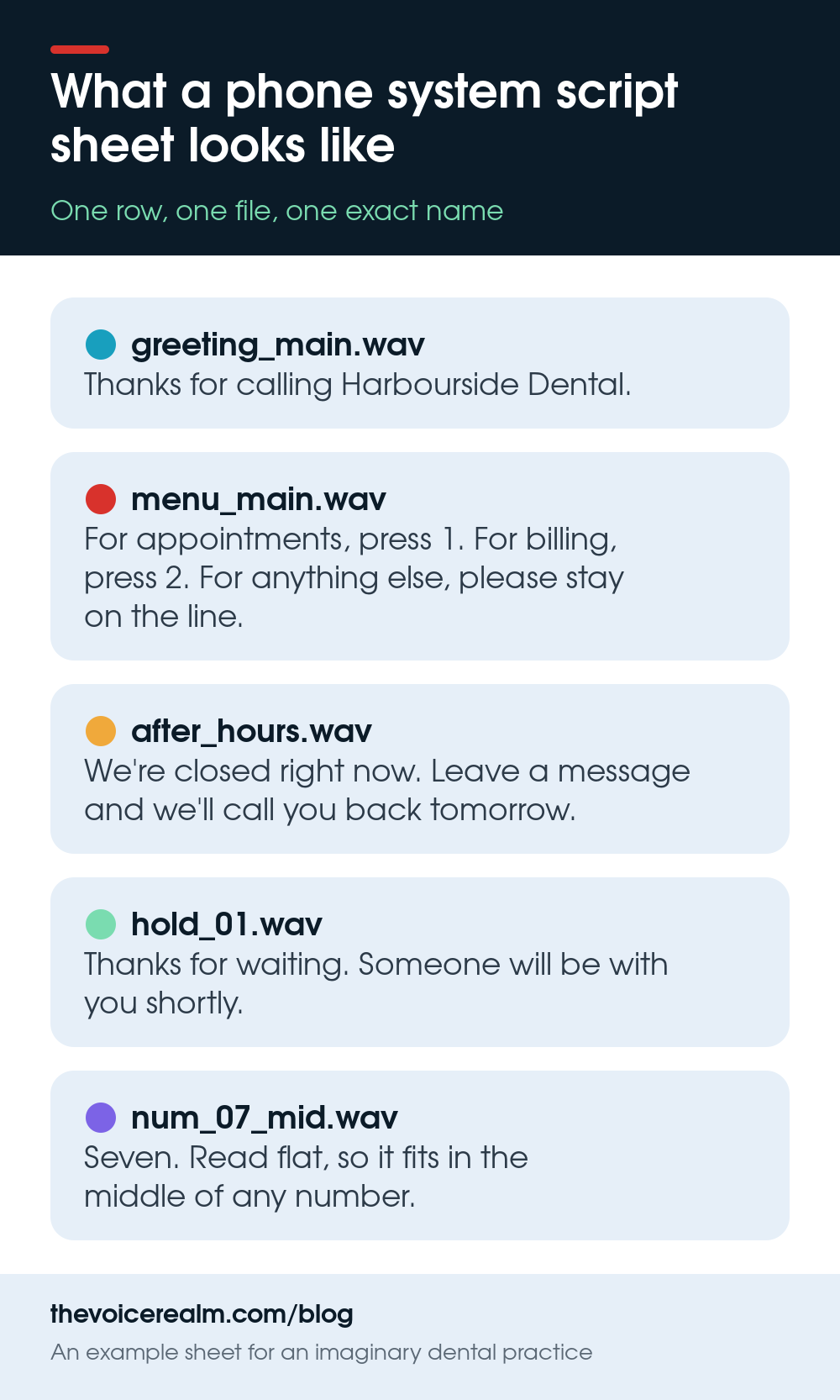
Forget a single script you read top to bottom. A phone system job usually arrives as a spreadsheet: one row per prompt, a column for the words, and a column for the file name each prompt must be saved as. A small business might send ten rows. A hospital or a bank might send several hundred.
The prompts fall into a few families. There’s the main greeting, the menu that lists the options, a set of department messages, after hours and holiday messages, on-hold messages that play between music, and error prompts for when a caller presses something that doesn’t exist. Bigger systems add the building blocks for numbers, dates and times, which the system stitches together on the fly.
Each prompt is its own file. That’s the single biggest difference from other voice work, and almost every rule below comes from it. Before you record a word, read the whole sheet, look for repeated phrases, and check that every row has a file name. If one doesn’t, ask now.
© The Voice Realm
Read the menu the way a caller hears it
A caller on a phone menu is doing two things at once: listening for the thing they want and getting ready to press a button. Your read has to make that easy. Steady pace, clear separation between options, and a tiny lift on the part they’re listening for.
The words matter as much as the read. If you’re given a script that puts the number first, it’s worth a polite note to the client, because the caller has to hold a number in their head before they know whether they want it.
“Press 1 for appointments.”
The caller hears a number, then has to remember it while waiting to find out what it’s for. By option four, most have forgotten option one.
“For appointments, press 1.”
The caller hears what they want first, then gets the number exactly when they need it. Nothing to remember, just act.
Don’t rewrite the client’s script yourself, though. Suggest it, and record what they approve. Some companies have legal or brand reasons for the exact wording, and the person who hired you might not be the person who wrote it.
Tone sits somewhere between friendly and calm. Callers ringing a phone system are often slightly annoyed already, so a big smiley commercial read can grate on the third listen. Think of a helpful person at a front desk who’s genuinely glad you called but knows you’re busy.

© The Voice Realm
Numbers, dates and spelling: the bits that get stitched
On larger systems you might record “one” through “ninety-nine”, “hundred”, the days of the week, the months and phrases such as “Your balance is”. The system then joins them to say “Your balance is two hundred and forty dollars”. The join is where it falls apart if you’re not careful.
The trick is to read each piece with a flat, neutral pitch that doesn’t rise or fall at the end, so any piece can sit next to any other. A “seven” read as the end of a sentence will sound like the end of a sentence every time it’s used, even in the middle of a phone number.
Clients will sometimes ask for two versions of each number: one in the middle of a phrase and one at the end, with a natural fall. If they do, label them exactly as asked, because the system picks the right file by its name.
Leave a clean, short gap before and after each piece, and keep the gaps the same length. Trim tight in the edit, but don’t cut into the breath on the first word or the tail of the last one. Stitched prompts with clipped edges sound like a robot with hiccups.

© The Voice Realm
One voice across hundreds of tiny files
Consistency is the whole job. A caller who hears the greeting in one tone and the menu in another, a few seconds later, notices immediately, even if they couldn’t tell you what’s wrong.
Record the whole set in one session if you can, at the same distance from the microphone, at the same time of day. Your voice in the morning is not your voice after lunch. If the job is too big for one sitting, record a reference prompt at the start of the first session and listen back to it before you begin each later one, matching energy and pitch before you carry on.
Our guide to mic distance and angle is worth a reread here, because a few centimetres of drift over a long session changes your tone more than you’d think. Mark your spot, and don’t move the stand between files.
 VOICEMASTERACADEMYLearn the craft in order.Module one is freeStart module oneTwenty modules, start to finish.
Keep a copy of every session’s raw files and your settings. Phone systems change. Six months later the client will ring asking for one new prompt, “New opening hours from Monday”, and it has to match the other two hundred perfectly. With your settings and a reference file, that’s a ten-minute job. Without them, it’s a full re-record.

© The Voice Realm
The 8 kHz reality
Phone calls carry far less sound than your studio captures. Most phone systems play prompts at a sample rate of 8 kHz, which simply can’t carry the high frequencies that give a voice its air and sparkle. What’s left is the middle of your voice, and that’s what callers hear.
The platforms say so plainly. Amazon’s guide for its Connect contact centre service says: “We recommend using 8 KHz .wav files that are less than 50 MB and less than 5 minutes long.” It adds that if you use higher rate files, the system “has to down sample them into 8 KHz samples because of PSTN limitations. This might result in low quality audio.” PSTN is the public phone network.
Cisco’s administration guide for its Unified Contact Center Express system tells administrators saving a prompt to choose “CCITT u-Law” and “8.000 kHz, 8 Bit, Mono 7 kb/sec”, and notes that it “supports audio playback of RIFF header .wav files only”. In plain English, that’s a standard WAV file in the telephone format called mu-law.
Twilio, which many businesses build their phone menus on, accepts several formats but warns that “High bitrate, lossy encoded files, such as 128kbps mp3 files, will take longer to transcode and potentially sound worse than files that are in lossless 8kbps formats.”
What this means for your read: crisp consonants matter more than ever, because the frequencies that make an S or a T clear are partly lost. Sibilance that’s fine in a commercial can turn into a hiss. A low, breathy delivery that sounds intimate in an audiobook turns to mush. Aim for clear, forward and centred.
Deliver what the phone system wants
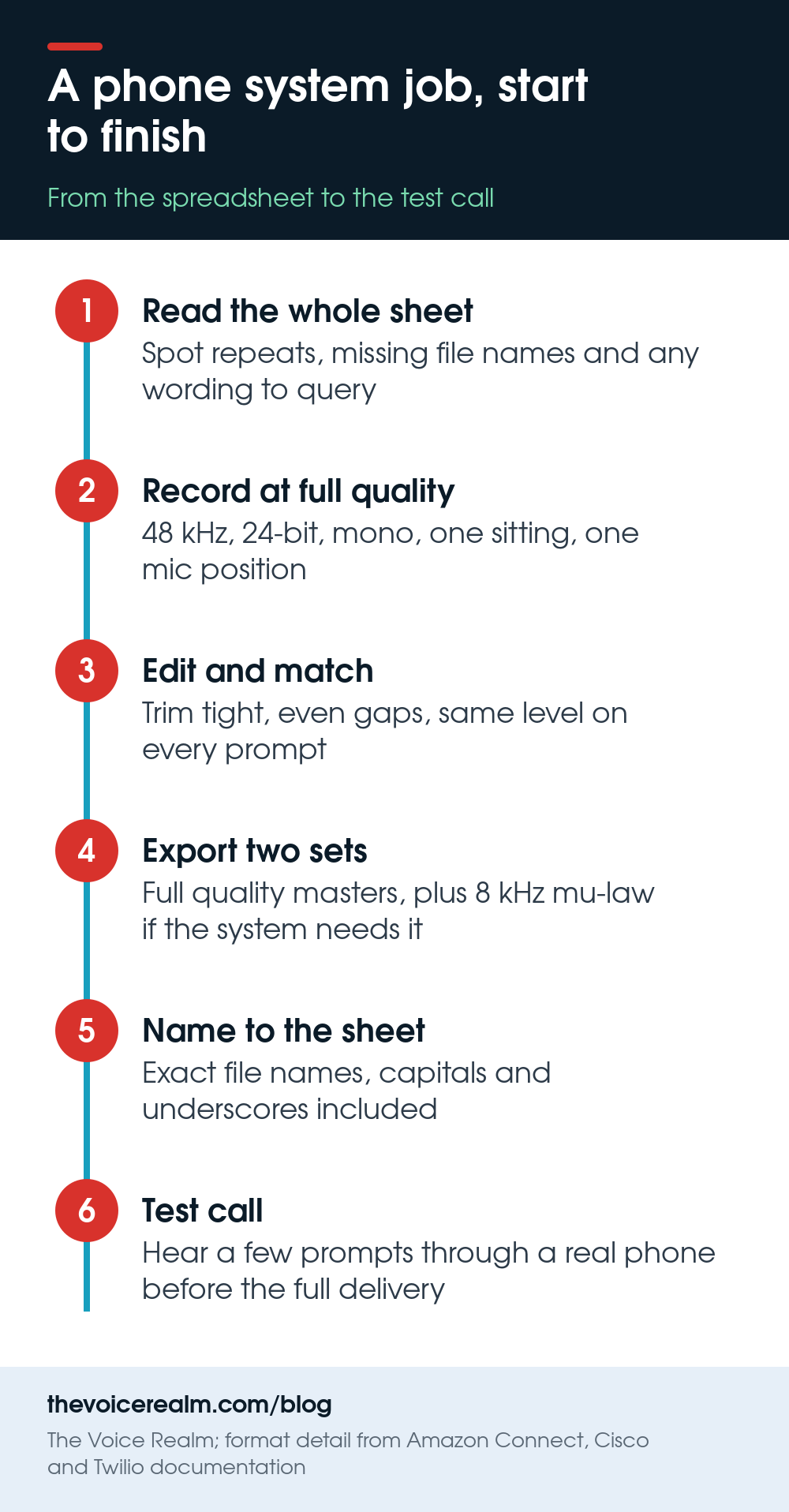
Always record at full quality: 48 kHz, 24-bit, mono, the same as any other job. You can’t add back what you didn’t capture, and the client may want a high quality version for their website or on-hold music later. Our guide to audio file specs walks through those settings.
Then ask the client what format their system needs. Many will name it exactly: an 8 kHz, 8-bit, mu-law WAV, or sometimes a-law, its close cousin. Others will say “just send WAVs” and let their system convert, which is where the quality loss Amazon warns about creeps in. If you can make the 8 kHz version yourself, offer both: the master files and a ready-to-load phone set.
When you convert, gently lower the level a touch and leave a little headroom, because loud files distort after the format change. Any decent audio editor can export mu-law WAV, and so can free command line tools if you’re doing hundreds at once.
Name every file exactly as it appears in the spreadsheet, character for character, with the same capitals and underscores. A phone system loads prompts by name. One wrong letter and a caller presses 3 and hears nothing at all.
Listen on an actual phone before you send
Studio headphones flatter phone prompts. The only honest test is to hear a few files the way a caller will: send them to your own phone and play them through the earpiece, or better, ask the client to load one or two into a test line and ring it.
Listen for three things. Can you understand every word at a normal listening level? Do the stitched numbers sound like one person saying one sentence? And does the menu leave enough space for a caller to think between options?
Fix anything you find before the full delivery, not after. A pickup on one prompt is easy. Re-cutting forty because the first one wasn’t checked is not.
© The Voice Realm
Usage, updates and the long relationship
Phone system recordings usually play for years, on one business’s own lines. That’s different from a broadcast commercial, so agree up front how the recordings can be used, and whether the on-hold messages might also turn up on a website or in an advert. If you’re unsure what to ask, our explainer on who owns your voice after the session covers the questions worth settling before you record.
Then make updates easy. Send a short note with the delivery that lists your settings, your mic, and the date, and keep that note with the files. When the business moves offices, changes its hours or adds a department, you want to be the obvious person to call, and the one who can match the old prompts without anyone hearing the join.
Phone work rarely makes anyone famous. But it’s steady, it rewards precision, and a voice that callers trust on a bad day is a real skill. If you’re ready for more of it, the voice over jobs board posts new castings most days.
Sources: “Create prompts in Connect Customer”, Amazon Web Services; “Management of Prompts, Grammars, Documents, and Custom Files”, Cisco Unified Contact Center Express Administration and Operations Guide; “TwiML Voice: Play”, Twilio.
Ready to get booked?
See the jobs open right nowAbout Sarah Robbins
Sarah Robbins writes for The Voice Realm about finding voice over work, home studios, casting and the business side of voice acting.