Blog
Have you ever been on holiday and suddenly received an audition request that is too hard to pass up, but you can’t do anything because you did not bring along any of your portable voice over equipment… and just the thought of missing out torments you for the rest of your break?
Or maybe, you are just not in your studio and a pick-up for a previous project is needed ASAP, what do you do?
Future Moments might just have the solution you need… MicSwap!
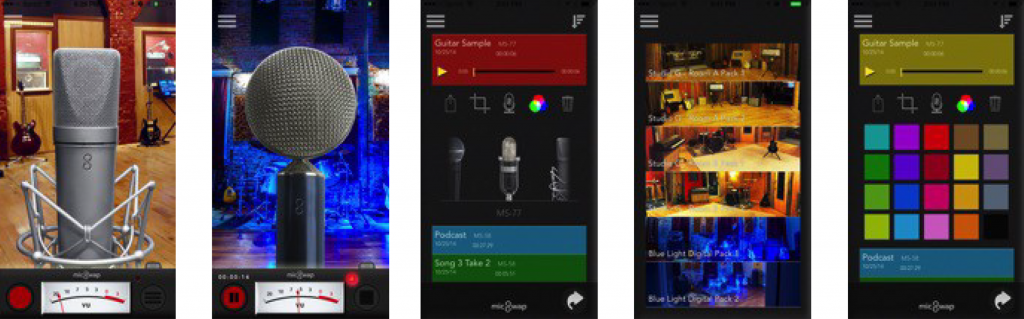
MicSwap is an intuitive recording app that simulates a real recording studio environment. Record with 13 of the best studio microphones around. It’s a microphone locker and recording studio in your pocket. Each mic has its own sound and you can choose between 13 (more coming) professional microphone emulations. You can also record and filter new or pre-existing audio.
How MicSwap came about
 MicSwap was created by Gary Levitt of Future Moments and programmer Wim de Nood. MicSwap transforms your ordinary iOS device into a studio, mic emulator and recorder.
Levitt, who played in bands and ran a recording studio, saw that they could capture a niche in the growing mobile music industry. He wanted to create an application that he as a musician can use. But Levitt shares that MicSwap is not just for musicians and singers. “We’ve got musicians, podcasters, voiceover artists, public speakers, sound hobbyists and various people recording various things using MicSwap in different ways for different reasons.”
Levitt explained that each professional microphone included in the app has its own sound and can be selected to get a sound that works best for the user’s needs. He continued, “This is especially helpful for voiceover artists to record mobile on the go. MicSwap also has a gain knob so you can be sure you’re getting a good level in your recording. You can also use one of our other apps AudioMaster to sweeten the mix and boost the volume. In MicSwap you can also change the sound after you record so you ensure you get the best tone before exporting and sharing.”
 VoiceEditSuiteAudition DirectorMarked-up scripts, ready to record.Emphasis, breaths, pauses and three ways to read it.See how it works
As a professional user, you can upgrade the app to MicSwap Pro, as it gives you the ability to use an external microphone or interface for high fidelity quality recording. Voice over talents can get a professional sound wherever they are with just an iOS device and a microphone.
The MicSwap Pro giveaway
Here at The Voice Realm, you can get a chance to explore MicSwap Pro and experience for yourself quality recording sound even when you are not in your studio. Here’s how…
Step 1) Want to know more about MicSwap? Leave a comment or ask a question below.
Step 2) Share this article on your Twitter account (https://wp.me/p4J71R-GW)
Step 3) Tag our Twitter handle (@TheVoiceRealm) along with your public profile link (e.g. thevoicerealm.com/talent/Emma.Jamieson)
Step 4) Don’t forget to add #MicSwapAtTVR on your tweet
Five randomly selected tweets or posts will receive full access to MicSwap Pro to use on your iPhone or iPad.
What reviewers say about MicSwap
Here’s what other sites think of MicSwap:
MicSwap is rated 9.9 on AppCrawlr and featured in TechCrunch, Forbes, MacLife and other music and app sites.
“Instagram for your voice” (Forbes)
“If you’re yearning to broaden your sonic palette but don’t happen to have a spare $2K to spend, you’ll like MicSwap Pro a whole lot.” (MacLife)
“MicSwap Turns Your iPhone Into Rock And Roll” (TechCrunch)
So download MicSwap now and tell us what you think below.
Ready to get booked?
See the jobs open right now